One-to-One Chat Architecture and Implementation
In this article, I’ll walk through the architecture and implementation details of a one-to-one chat system. This chat system supports both text messages and non-text messages (such as media). I’ll cover how messages are transmitted, acknowledged, and handled in various scenarios, with the help of sequence charts I’ve created to illustrate the flow.
Overview
One-to-one chat in a Web3 environment provides a secure, real-time messaging experience between users. In our case, the chat supports both text and media, with token-based authentication and message handling via socket communication. Let’s dive into the flow for both text and media messages.
1. One-to-One Chat for Text Messages
In this scenario, we explore how a basic text message is handled between two users. The flow covers connecting to the server, sending messages, receiving acknowledgments, and ensuring message delivery even when the recipient is offline.
Sequence Flow
Here’s the step-by-step sequence for handling a text message:
-
User Authentication
Each user authenticates by emitting aconnectevent with a JWT token. The server validates this token before retrieving any unread messages. -
Message Sending
After successful connection, User A sends a message to User B. The message contains the recipient’s wallet address, message type, and content.
The server stores this message and acknowledges receipt with a success status (ackevent). -
Message Delivery
If User B is online, the message is forwarded immediately. User B’s front-end listens for incoming messages and displays them. A message receipt acknowledgment is sent back to the server, which updates the message status to “read.” -
Handling Offline Users
If User B is offline, the server stores the message as “undelivered.” Once User B reconnects, the message is forwarded and the flow continues with acknowledgment. -
Error Handling
In case of any error during the message send process, an error event is emitted to the sender, allowing the front-end to display appropriate feedback to the user.
Sequence Chart
The following diagram shows the detailed flow for text messages:

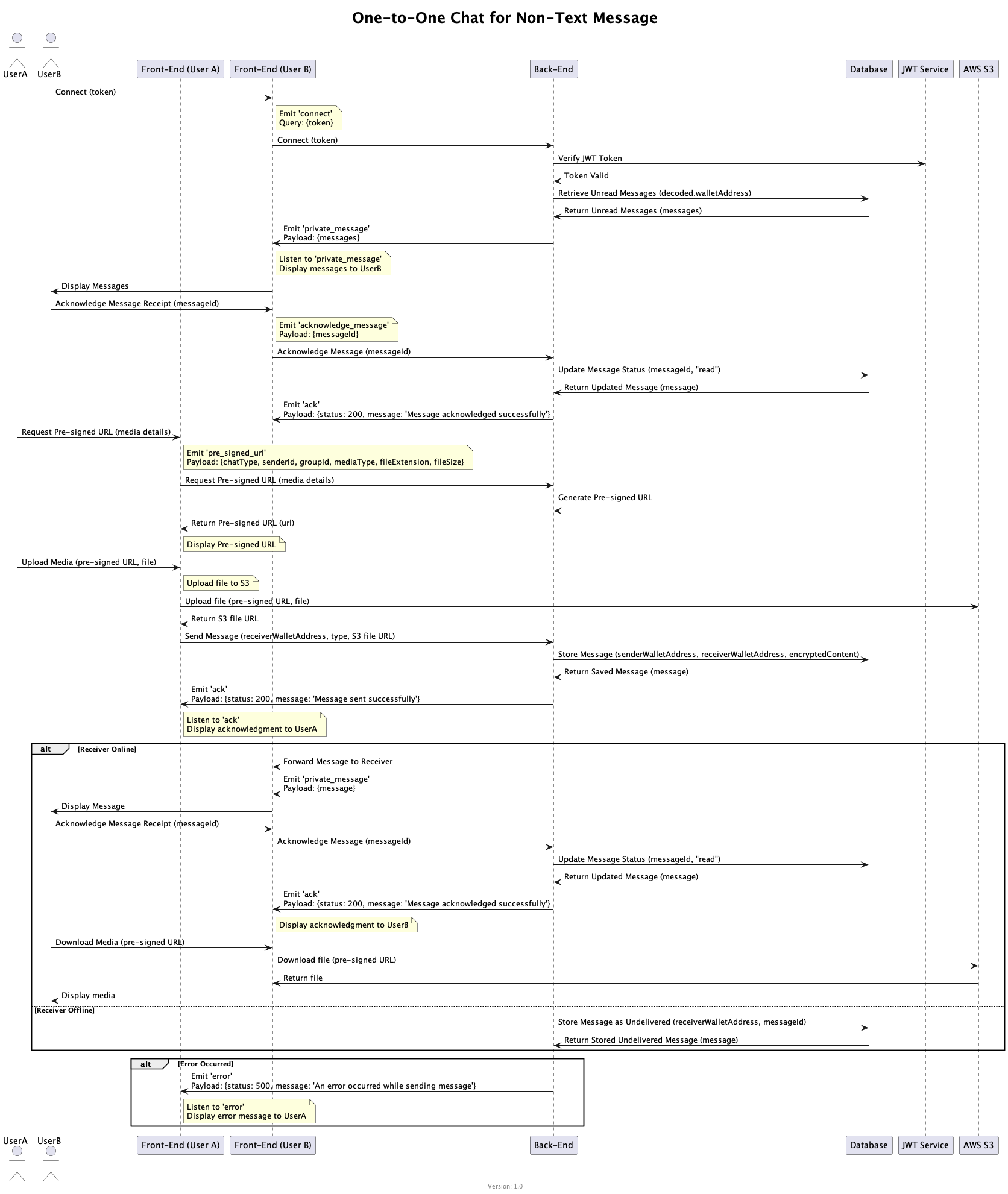
2. One-to-One Chat for Non-Text Messages (Media)
The flow for sending media (such as images or videos) involves additional steps, particularly around uploading the media to a cloud storage service (e.g., S3) before sending the message.
Sequence Flow
Here’s how a media message is handled:
-
User Authentication
The process starts similarly to text messaging, with both users authenticating via JWT tokens. -
Request Pre-signed URL
Before uploading media, User A requests a pre-signed URL from the server, which allows direct upload to cloud storage (AWS S3 in this case). -
Media Upload
Once the pre-signed URL is returned, the front-end uploads the media file directly to the cloud storage. -
Send Media Message
After successful upload, User A sends the message containing the S3 file URL, recipient’s wallet address, and message type to the server.
The server stores the message and sends an acknowledgment back to User A. -
Media Delivery
If User B is online, the message is forwarded with the S3 file URL. User B downloads the media from the cloud and displays it in the chat.
If User B is offline, the message is stored and delivered once they reconnect. -
Handling Errors
If an error occurs during the media upload or message sending, an error event is emitted, notifying User A of the failure.
Sequence Chart
The following diagram illustrates the flow for non-text (media) messages:
Conclusion
The above architecture outlines how one-to-one chat works for both text and media in a real-time, secure Web3 environment. By handling acknowledgments, offline users, and cloud-based media uploads, this system ensures seamless communication between users while maintaining message reliability and security.